RuoYi-Vue-Plus之登录功能
文档地址:点击这里
项目地址:点击这里
用户可以选择密码登录、短信登录、第三方登录、邮件登录、小程序登录(需要扩展)。不同的登录方式执行方法不一样。执行登录时,不管是什么登录方式,都会访问AuthController的login方法。第三方登录会先访问AuthController的authBinding方法,再访问AuthController的login方法。
AuthController.login方法
   /**
    * 登录方法
    *
    * @param body 登录信息
    * @return 结果
    */
// 前端传过来的数据加密,后端返回的数据也加密。配合cryptoFilter使用
   @ApiEncrypt(response = true)
   @PostMapping("/login")
   public R<LoginVo> login(@RequestBody String body) {
       LoginBody loginBody = JsonUtils.parseObject(body, LoginBody.class);
       // 校验参数
       ValidatorUtils.validate(loginBody);
       // 授权类型和客户端id
       String clientId = loginBody.getClientId();
       String grantType = loginBody.getGrantType();
       SysClient client = clientService.queryByClientId(clientId);
       // 查询不到 client 或 client 内不包含 grantType
       if (ObjectUtil.isNull(client) || !StringUtils.contains(client.getGrantType(), grantType)) {
           log.info("客户端id: {} 认证类型:{} 异常!.", clientId, grantType);
           return R.fail(MessageUtils.message("auth.grant.type.error"));
       } else if (!UserConstants.NORMAL.equals(client.getStatus())) {
           return R.fail(MessageUtils.message("auth.grant.type.blocked"));
       }
       // 校验租户
       loginService.checkTenant(loginBody.getTenantId());
       // 登录
       LoginVo loginVo = IAuthStrategy.login(body, client, grantType);

       Long userId = LoginHelper.getUserId();
       scheduledExecutorService.schedule(() -> {
           WebSocketUtils.sendMessage(userId, "欢迎登录RuoYi-Vue-Plus后台管理系统");
       }, 3, TimeUnit.SECONDS);
       return R.ok(loginVo);
   }
IAuthStrategy.login方法
String BASE_NAME = "AuthStrategy";

  /**
   * 登录
   */
  static LoginVo login(String body, SysClient client, String grantType) {
      // 授权类型和客户端id
      String beanName = grantType + BASE_NAME;
      if (!SpringUtils.containsBean(beanName)) {
          throw new ServiceException("授权类型不正确!");
      }
      IAuthStrategy instance = SpringUtils.getBean(beanName);
      return instance.login(body, client);
  }
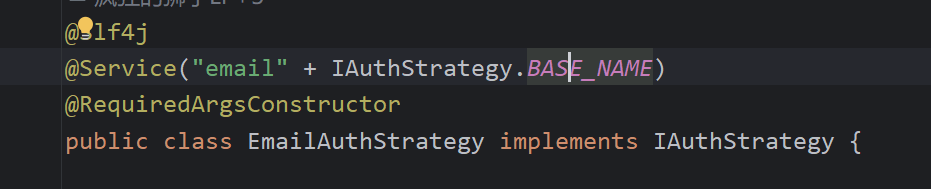
接口IAuthStrategy,五个登录类都实现了该接口。针对不同的登录方式,执行不同的代码。

这五个类的@Service上,配置着beanName,例如emailAuthService类
属性解释
clientId
clientId含义是:你登录的平台是什么,项目支持pc端和app端登录(需要扩展)。这是由前端写死然后传给后端。根据你登录的平台,前端传递相应的clientId。
grantType
grantType的含义是:授权类型,即你通过什么方式登录。例如密码登录,第三方授权登录等等。

RuoYi-Vue-Plus之登录功能
http://example.com/2024/05/11/RuoYi-Vue-Plus之登录功能/